Expanded lineup brings together electric standing desks, fixed-height studio desks and workstation accessories for home offices, creators, streamers and other multi-device users
Eureka Ergonomic has upgraded its Aero Series, expanding the collection from a desk lineup into a more complete workstation system designed for today's increasingly complex multi-monitor and multi-device workflows. The updated Aero family brings together electric standing desks, fixed-height studio desks and workstation accessories, giving remote professionals, designers, content creators, streamers and gamers more flexibility to build workspaces around the way they work, create and use their devices.
The Eureka Ergonomic Aero Series shows how standing desks are evolving to meet these changing needs. Built around its signature wing-shaped desktop, the collection includes both electric standing desks and fixed-height models for multi-monitor, multi-device setups. From creative studios and home offices to design workspaces, editing suites, and streaming stations, the Aero Series supports a wide range of modern workflows.
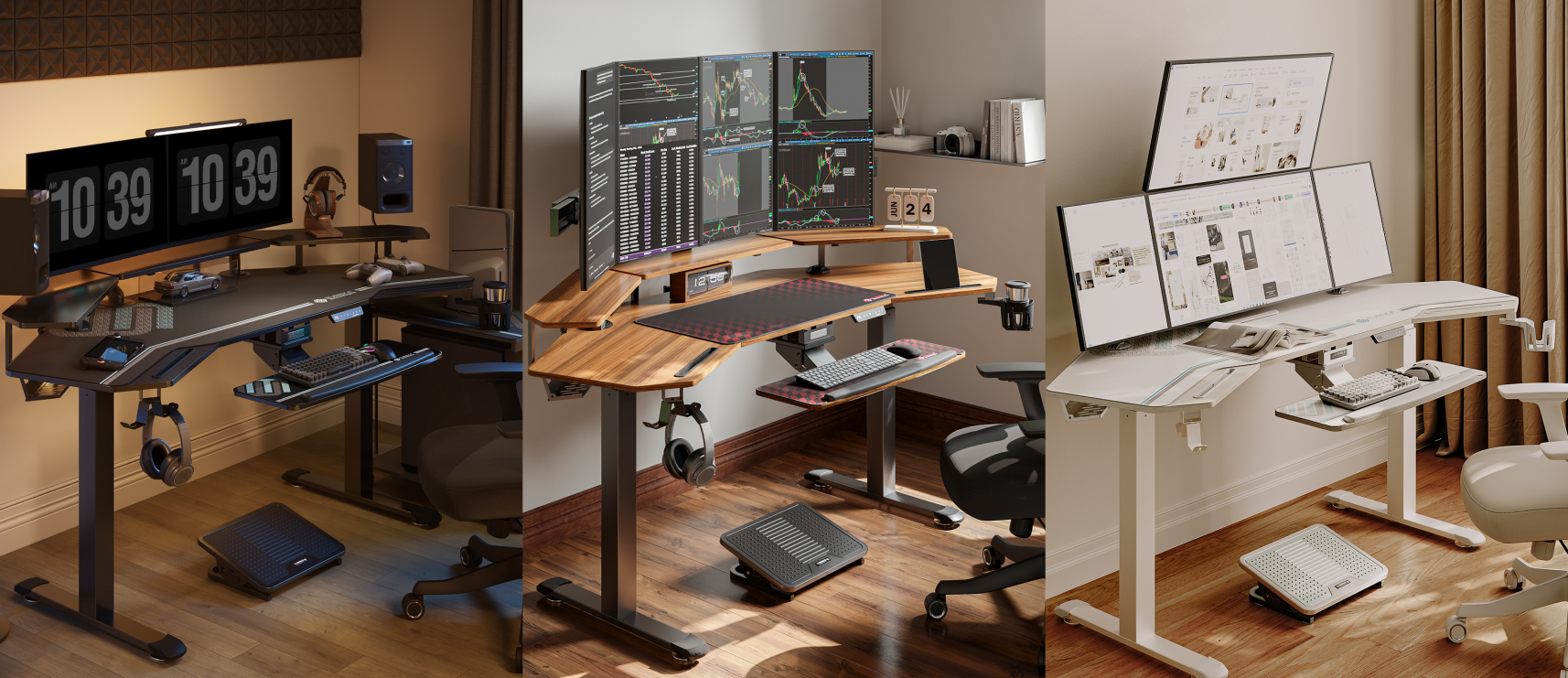
The Aero Series: From a Desk to a Multi-Device Workstation
Rather than differentiating models by size alone, the Aero Series is built around different workflows and ways of working.
The lineup includes the Aero Pro 63" and Aero Pro 72" Electric Standing Desks for sit-stand productivity, plus the Aero Wing-Shaped Studio Desk (73") and fixed-height Studio Desk models in 63-inch and 72-inch sizes.
The fixed-height models focus on spacious work surfaces and integrated features such as equipment storage, a keyboard tray, and RGB lighting for creative and gaming setups. The Aero Pro models add dual-motor height adjustment, allowing the entire workstation to move with the user throughout the day.
Together, the Aero Series offers flexible workstation solutions for creators, professionals, and multi-device users—from electric standing desks to dedicated fixed-height setups.
| Product | Best For | Ideal Use Cases |
| Aero Pro 63" | Sit-Stand Productivity • Multi-Device Organization • Space Efficiency | Home Office • Dual-Monitor Setups • Design Work • Streaming • Work & Gaming |
| Aero Pro 72" | Sit-Stand Productivity • Expanded Workspace | Triple-Monitor Setups • Content Creation • Music & Video Production • Studio |
| Aero Wing-Shaped Studio Desk | Fixed Height • Large Work Surface • Integrated Accessories | Studio • Streaming • Gaming Setup |
| Aero Fixed Studio Desk | Fixed Height • Multiple Size Options | Dedicated Workstations • Fixed Multi-Device Setups • Users Who Don't Need Sit-Stand Adjustment |
Despite their different configurations, every Aero model shares the same core philosophy: designing the workspace around the user and their workflow, rather than forcing the workflow to fit a conventional desk.
Design Philosophy: Bringing the Most Usable Workspace Within Reach
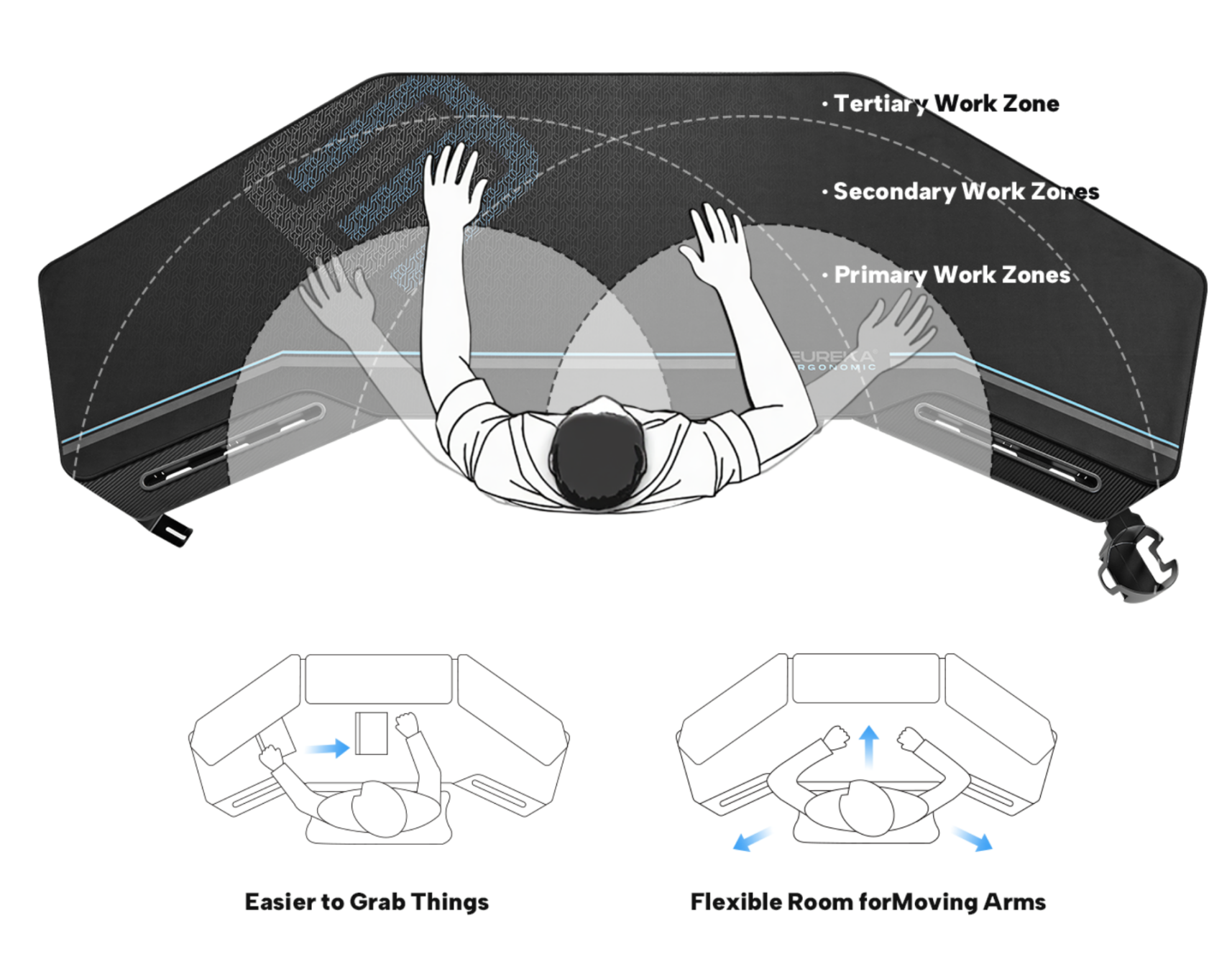
Wing-Shaped Desktop: Optimizing the Way You Interact With Your Workspace
Most traditional computer desks create more workspace simply by making the desktop wider. The Aero Series takes a different approach with its signature wing-shaped desktop, extending the work surface toward the user on both sides.
This isn't just a visual difference—it changes how users interact with their everyday tools.
According to OSHA's Computer Workstations Purchasing Guide, multi-monitor workstations should provide adequate display space while keeping the primary monitor and frequently used devices within a comfortable reach zone.
The Aero desktop follows these principles, with a center section for the primary monitor, keyboard, and mouse, and extended wings for speakers, drawing tablets, mobile devices, and other accessories.
For a multi-monitor workstation, the goal isn't simply a larger desktop, but more usable space within easy reach. That's the core philosophy of the Aero Series: keeping essential tools accessible for a smoother, more efficient workflow.
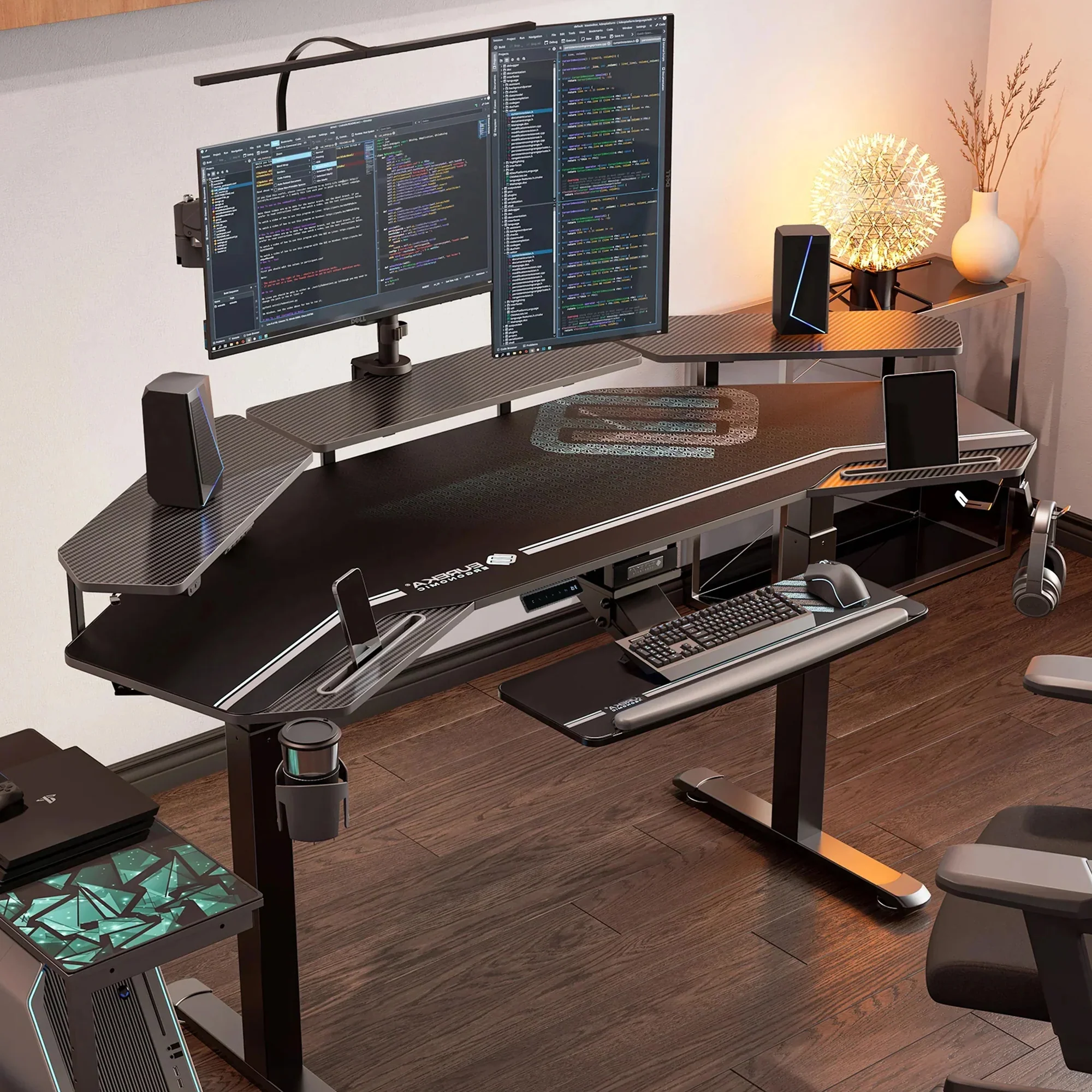
From Flat Layouts to Layered Workspaces: Freeing Up the Primary Desktop
Another challenge with multi-monitor workflows is that displays and accessories can quickly take over the primary work surface.
The Aero Pro addresses this with three adjustable monitor shelves, moving equipment off the main desktop while keeping essentials organized with a mobile device stand, headphone holder, and integrated cable management. This leaves more room for a keyboard, mouse, drawing tablet, or other task-specific tools. Combined with its Multi-Device Setup and signature Wing-Shaped Desktop, the design keeps the workstation more organized.
The goal isn't simply to add accessories, but to make it easier to adapt the setup as needs change.
The real question is whether a workspace can adapt to different tasks and workflows.
Electric Height Adjustment: Moving the Entire Workstation With You
One of the clearest differences between the Aero Pro models and the fixed-height Studio Desk is height adjustment.
Both the Aero Pro 63" and Aero Pro 72" feature dual motors, support up to 220 lb, and offer a height range of approximately 29.5" to 48". For multi-device setups, the entire workstation—including monitors, speakers, and other equipment—moves with the desktop, allowing users to switch between sitting and standing without rearranging their setup.
Aero Pro 63" vs. Aero Pro 72": The Difference Comes Down to Your Workflow
The two models differ by 9 inches, but the decision isn't really about those extra inches. It comes down to how many devices you use, how much space you have, and how much room you may need to expand your setup in the future.
| Comparison | Aero Pro 63" | Aero Pro 72" |
| Desktop Width | 63" | 72" |
| Height Range | 29.5"–48" | Approx. 29.5"–48" |
| Weight Capacity | 220 lb | 220 lb |
| Lifting System | Dual Motor | Dual Motor |
| Adjustable Monitor Shelves | 3 | 3 |
| Monitor Shelf Capacity | 30 lb each | 30 lb each |
| Typical Setup | Dual monitors / Laptop + monitor | Triple monitors or more complex multi-device setups |
| Ideal Space | Mid-size home offices, bedroom workspaces | Dedicated home offices, creative studios |
| Best For | Remote workers, designers, streamers, work & gaming users | Content creators, video editors, music producers, multi-monitor professionals |
| Key Advantage | Space Efficiency | Room to Expand |
The two models offer similar height-adjustment performance, so the choice comes down to how much workspace your setup actually requires.
The Aero Pro 63" is ideal for users who want a complete, organized workflow in a more space-efficient footprint.
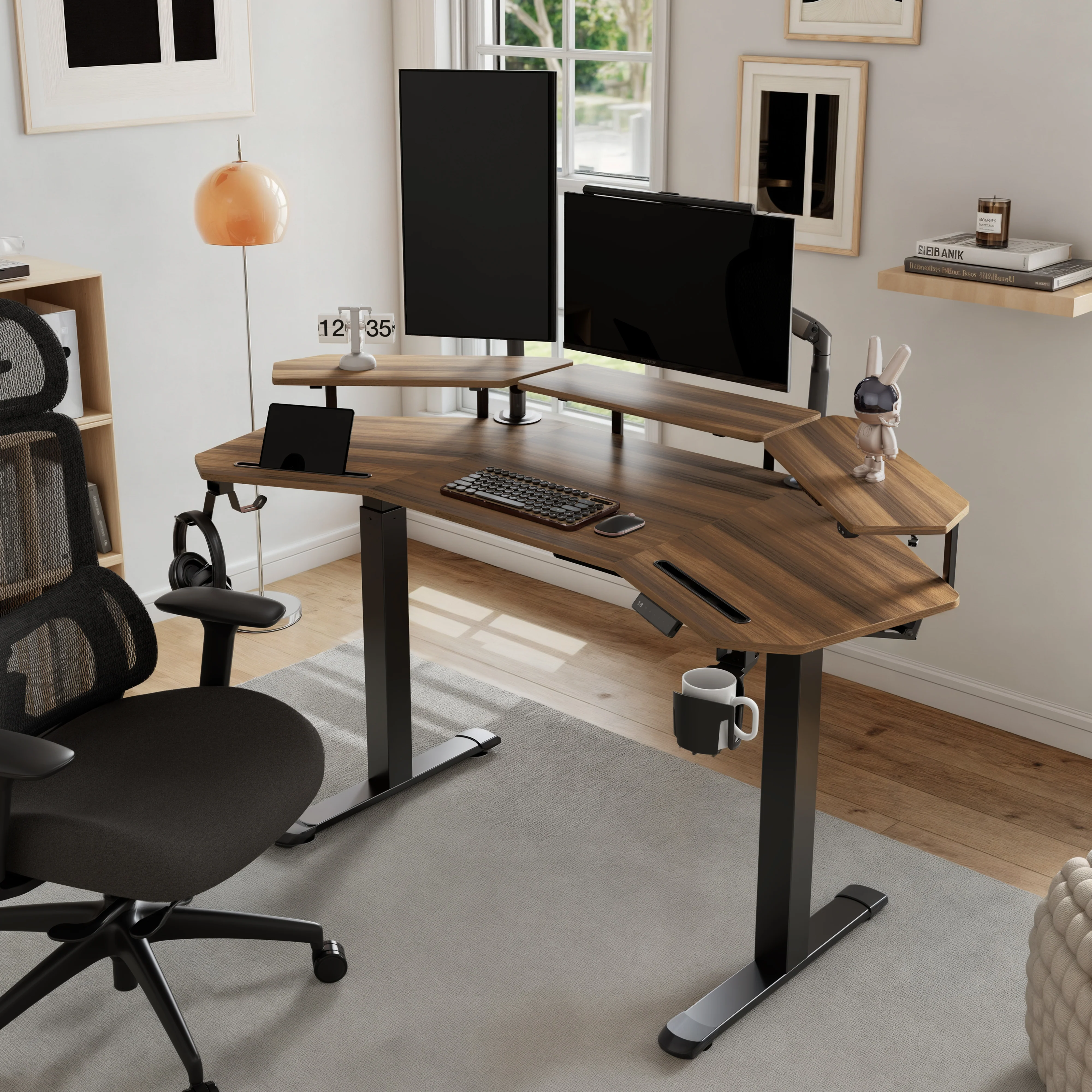
From an Aero Desk to a Complete Professional Creative Workstation
Once a professional creative desk is put into daily use, it becomes the centerpiece of the workstation—not the entire setup.
The Aero Series also includes a dedicated Accessories Suite, with products such as CPU carts, single and dual monitor arms, and footrests that extend the workstation ecosystem.
With Aero as the foundation, users can build a more complete creative workstation around four key zones:
| Workstation Zone | Recommended Products | What It Solves |
| Seating Support | Typhon II / Axion Ergonomic Hybrid Chair | Provides greater adjustability and body support for long hours of work, creative projects, or gaming |
| Leg Support | Adjustable Ergonomic Footrest / Dual-Level Foot Rest | Provides more flexible foot positioning and leg support while seated |
| Display Setup | Single / Dual Monitor Arm | Adjusts screen height, angle, and viewing distance while freeing up valuable desktop space |
| PC Setup | Mobile Height Adjustable CPU Cart | Moves a large PC tower off the desktop while maintaining mobility, airflow, and space for device management |
For example, the Typhon II offers adjustable lumbar support, a reclining backrest, and 3D armrests, while the Axion adds a 4D headrest and seat-depth adjustment for users who spend long hours at their workstation.
For multi-monitor setups, single and dual monitor arms support screens up to 32 inches and offer rotation and tilt adjustments for a more flexible viewing setup.
The Mobile CPU Cart moves full-size PC towers off the desktop, with a mobile, height-adjustable, two-tier design that keeps larger equipment organized while freeing up workspace.
Together, these accessories turn the Aero Series from a desk into a complete workstation system built around the user's workflow:
Chair → Posture
Monitor Arm → Vision
Aero Desk → Workflow
Footrest → Lower-Body Support
CPU Cart → Device Organization
From Home Offices to Creative Studios: How Aero Adapts to Different Spaces
In a home office, the Aero Pro 63" fits a dual-monitor setup, laptop, and everyday work devices in a space-efficient footprint, making it well suited as a primary workstation.
For creative studios and edit suites, the Aero Pro 72" provides more room for speakers, drawing devices, controllers, and additional monitors.
For streaming and gaming setups that don't require frequent sit-stand adjustment, the fixed-height Aero Studio Desk offers a spacious work surface with the signature wing-shaped layout and integrated equipment features.
Together, the Aero Series adapts the same design language to different spaces, equipment, and workflows.
After 4,000+ Customers, Real-World Use Says More Than Specifications
Specifications show what a desk can do; real-world setups show how people actually use it.
According to Eureka Ergonomic sales data, more than 4,000 customers have purchased Aero Series products, with setups spanning home offices, multi-monitor workstations, streaming, music production, and creative workflows—not just gaming.
UGC on the Aero Pro 63" and 72" product pages further reflects this range, from dual- and triple-monitor setups to dedicated workstations for content creation and music production.
The Aero Series isn't simply an office or gaming desk—it's a personal workstation that adapts to how you work, create, and play.
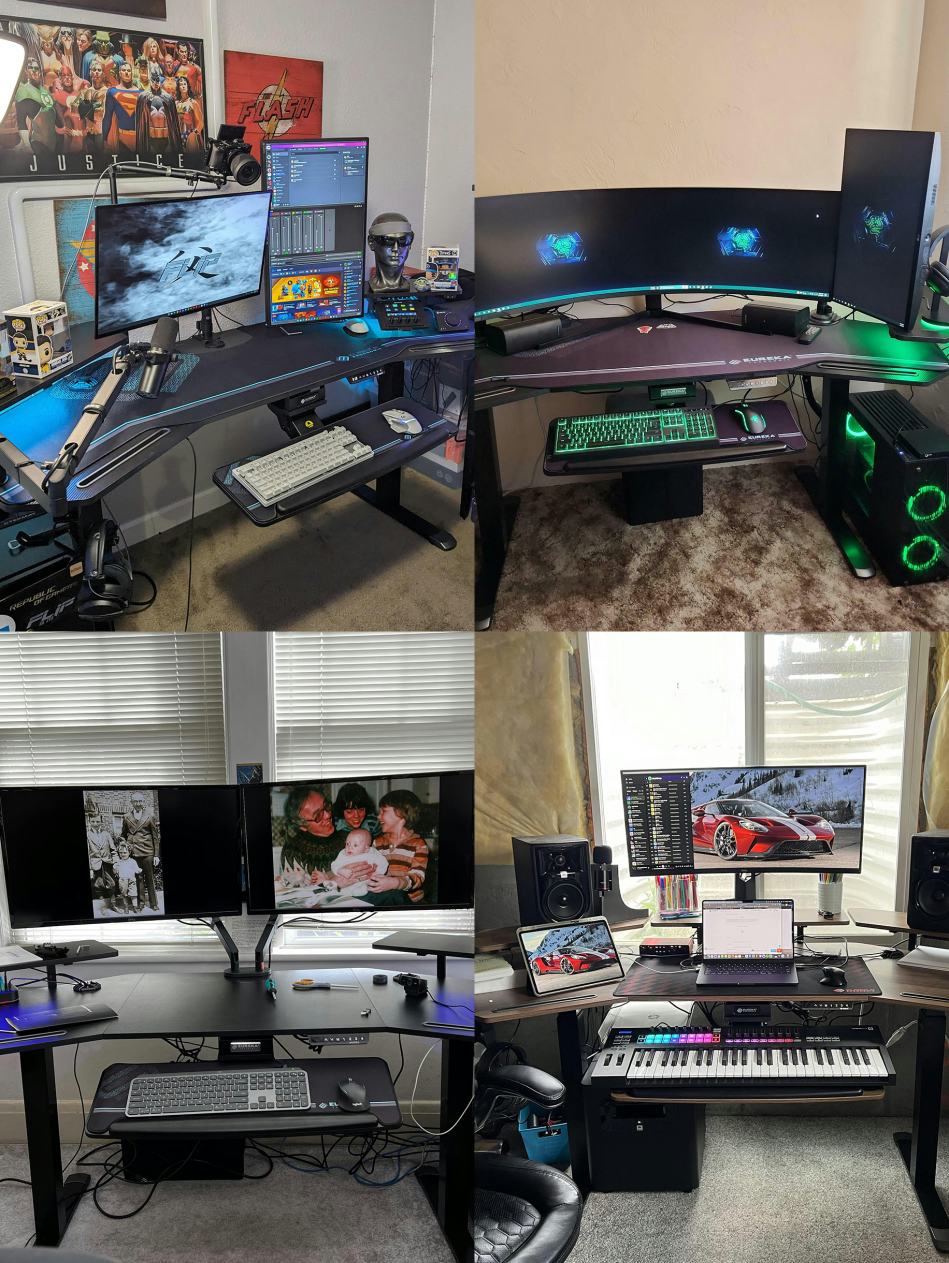
The Aero Series has also gained attention from media and creators. Eureka's Aero Series page highlights coverage from IGN, NBC Select, and TechRadar, spanning gaming desk recommendations and reviews across the lineup.
In its review of the fixed-height Aero AED-E70B, TechRadar highlighted its spacious desktop, adjustable monitor shelves, and stability. NBC Select also featured Eureka's wing-shaped desk in its gaming desk recommendations, citing its 72-inch work surface and capacity for monitors, speakers, and gaming peripherals.
As the Aero Series expands from gaming desks into broader creator workstations, this media coverage and real-world use show how the lineup fits today's work, creative, and entertainment workflows.
Conclusion: From Standing Desk to Creator Workstation
The next evolution of the standing desk isn't simply about more height adjustment or a larger desktop.
As home offices, digital creation, streaming, and entertainment converge, a better workspace should answer three questions:
Can it organize your devices? Support your body? Adapt as your tasks change?
The Aero Series offers electric standing desks and fixed-height models for different workflows. The Aero Pro 63" prioritizes space efficiency, while the Aero Pro 72" provides more room for complex setups and expansion. The fixed-height Studio Desk offers a spacious option for users who don't need sit-stand adjustment.
Paired with an ergonomic chair, footrest, monitor arm, and CPU cart, Aero becomes more than a standing desk—it becomes a professional creator workstation built around your equipment, space, and workflow.
Explore the Eureka Ergonomic Aero Series for products, real-world setups, media coverage, and accessories.

Ryan Hu
Ryanhu@eurekaergonomic.com